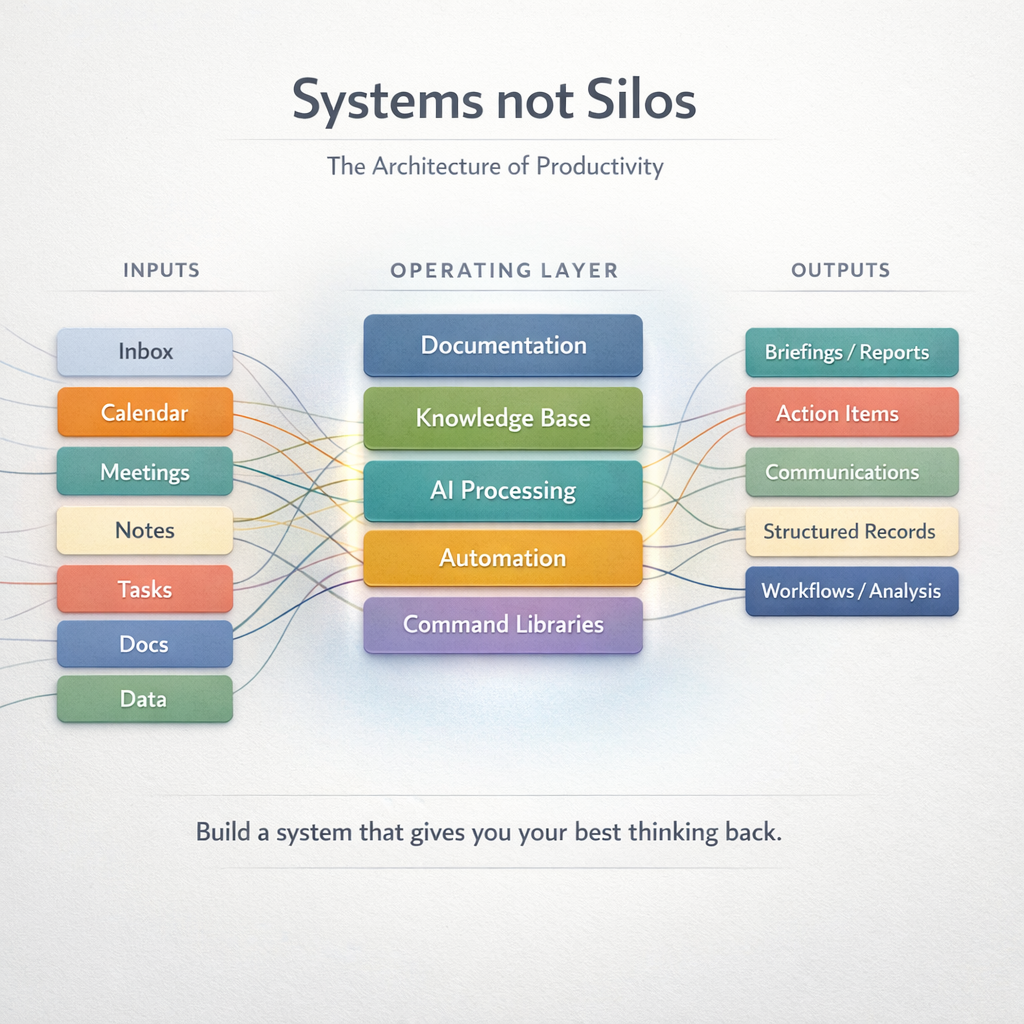
A practical guide to building a system that gives your best thinking back.
Most productivity advice is about tactics, wake up earlier, use this app, try this habit. What it rarely addresses is architecture. The difference between a productive person and a scalable one isn't effort or discipline alone. It's whether they've built a system, a set of defined inputs, transformation rules, storage locations, and outputs, that governs recurring work without requiring them to reinvent the wheel every time.
I work at the intersection of academic research, software development and platform operations, technical support, and client account management. The result is constant context-switching across all of those domains, and managing that volume manually, keeping it all in my head, improvising responses to recurring situations, would be unsustainable. Over time, I've built what I think of as a professional operating system. Here's how it works, and how you can build one too.
The Foundational Principles
Before any specific tool or workflow, six principles shape everything. Get these right and the rest follows naturally.
Systems, not silos may be the most important principle of all. Most of us already have tools, email, a notes app, a task manager, file storage like Google Drive or Dropbox. The problem is that each operates in isolation. When your tools don't talk to each other, you do the connecting manually, and that overhead compounds fast. Connecting your systems into a coherent workflow doesn't just reduce friction, the productivity gains are exponential.
Low friction is another critical principle in productivity design. A system that's annoying to use won't be used. Every component I adopt has to actively reduce effort, not add to it. Fewer clicks to capture a task, fewer decisions about where something goes, fewer moments where the system itself becomes the obstacle.
Documentation keeps institutional knowledge from living in your head, where it's inaccessible to your future self, your team, or the AI tools you rely on. Writing things down isn't archival, it's operational leverage. A well-documented decision, process, or explanation can be reused by a person, a model, or both.
Knowledge Bases take documentation further, turning scattered notes into a queryable, interconnected system that surfaces the right context at the right moment. Your knowledge base is the difference between starting from scratch every time and building on what you've already figured out.
Automation handles the repeatable. Any task you do the same way twice is a candidate for a rule, template, or script. The goal is to reserve your attention for decisions that genuinely require judgment, and delegate everything else to the machine.
AI is the multiplier that makes all of this dramatically more powerful, not as a replacement for thinking, but as a transformation engine. Raw inputs like emails, meeting notes, and documents are processed into structured outputs: briefings, task lists, CRM updates, polished communications. The key is treating AI not as a chatbot, but as a deterministic layer in a workflow.
Breaking Down the Silos
The average knowledge worker uses a dozen tools daily, and most of those tools have no idea the others exist. Email doesn't know what's in your task manager. Your notes don't link to the files they reference. Your calendar sits entirely disconnected from the project context it belongs to. The result is that you become the integration layer, manually bridging gaps that the system should be handling automatically.
You shouldn't be the integration layer between your own tools.
This is what a silo looks like in practice: a client sends an email with important context, you mentally note it, it gets buried in your inbox, and two weeks later you're re-reading the thread trying to remember where things stand. Or a meeting produces a decision that lives only in someone's head, or worse, in a raw transcript no one will reread, and it never makes it into the system where it can actually inform future work.
The fix isn't more tools. It's connecting the ones you already have into a coherent flow. When your email feeds your task manager, when your meeting notes link to your CRM records, when your files are tied to the projects they belong to, information captured once becomes available everywhere it's needed. You stop re-reading, re-explaining, and reconstructing. The system carries context forward so you don't have to.
This is why the architecture of your workflow matters as much as the individual tools you choose. A great task manager used in isolation is still just a list. A notes app that doesn't connect to your work is just a pile. But tools that talk to each other, that pass context downstream and surface it when it's relevant, create something that's genuinely greater than the sum of its parts.
Your Knowledge Base: The Thinking Infrastructure
The goal isn't to remember everything. It's to not need to. A well-designed knowledge base means you can reconstruct context without rereading old threads, answer recurring questions from a single source of truth, and hand off work without losing continuity.
A good knowledge base means you never have to reconstruct context from scratch.
I use Notion as my central knowledge base. The discipline isn't in picking the tool, it's in what goes in and what doesn't. Notion is not meant to capture raw thought. It's meant to capture resolved structure: information that has been processed into something coherent, categorized, and aligned with an existing schema.
A CRM entry should reflect the current state of a client relationship, not just a timeline of every email exchanged. A meeting note should capture what matters for future use, not just a transcript. History still matters, but it lives in structured fields and linked records, not in an ever-growing pile of appended notes.
One of the most powerful moves I made was feeding my existing documentation, decision logs, and operational notes into an LLM to generate a clean, structured markdown knowledge base. The model doesn't add information, it organizes what's already there into a reusable format. That knowledge base then becomes the foundation for every AI workflow downstream: meeting prep, briefings, email drafts, and more.
Getting information into the system needs to feel nearly effortless, Zoom summaries, emails, PDFs, and quick notes all have a defined home. Getting information out is where AI earns its keep: ask a question, get a direct, contextually informed answer, without digging through folders.
Task Management: The Execution Layer
The task system isn't where work is thought about. It's where work is committed to. That distinction matters enormously.
Tasks are outputs of a process, not a dumping ground for everything on your mind.
I use Todoist as my execution engine, with a simple rule: a task only appears there if someone on my side needs to do something concrete. Not vague blobs like "deal with that issue" or "think about pricing" but actual action statements: Send a summary of options discussed. Confirm data transfer mechanism. Review extension pricing edge case. I use a simple priority structure to ensure the most operationally consequential work surfaces first.
Tasks are outputs, not intake. A meeting doesn't automatically become a task, specific actions extracted from the meeting do. An email doesn't become a task because it exists, the required next step does. As work progresses, I keep running comments directly within the task itself, quick status notes, blockers, or links back to the relevant Notion record or email thread, so all the context is one click away without cluttering the task list itself.
The task system also has a hard boundary with the knowledge base. Notion answers what is this thing, and what's its current state? Todoist answers what do I need to do right now? Once you stop mixing those two questions into the same tool, both become dramatically more useful.
Meetings: Before, During, and After
Meetings are productivity's biggest drain, or its biggest asset, depending on how deliberately you manage them.
The real work of a meeting happens before and after, not during.
Before: Pull the relevant record from your knowledge base, review the last interaction, identify open loops, and generate a structured agenda. This replaces walking into a meeting cold and relying on memory. Good prep also means you drive the conversation rather than just react to it.
During: I rely on AI transcription, Zoom's native summaries or Otter.ai, to capture the conversation so I can stay present. Trying to take notes while thinking means you're doing neither well. The summary is raw material, not the final artifact.
After: The summary gets processed immediately. Extract internal action items (only the ones your team owns, nothing that belongs to external collaborators), update the relevant record in your knowledge base, and push tasks to your task manager. The structured note lives in Notion; the tasks live in Todoist. The raw transcript is never consulted again.
A few rules I've found essential for extracting tasks from meetings: keep each item to a single line, use neutral action language, don't merge tasks, and never invent tasks that weren't actually discussed. The goal is clean, executable output, not a verbose re-transcription of what happened.
The Inbox as a Workflow Engine
Email is where most people's productivity systems break down. The inbox becomes a to-do list, a filing cabinet, a conversation thread, and a reminder system all at once, which means it functions as none of them well.
Your inbox is an input stream, not a management system, treat it like one.
My approach is to treat the inbox as an input stream, not a management system. Emails arrive, get processed into structured outputs (tasks, CRM updates, briefings, replies), and the inbox is no longer the place where work "lives."
The specific workflow I've built is an inbox briefing: a structured summary of what matters, organized by operational category, client and study support, finance and contracting, internal admin, and high-priority items from key stakeholders. Each item in the briefing includes what happened, whether it's waiting on me or waiting on someone else, and what the next action is.
This briefing replaces manual inbox scanning. Instead of triaging dozens of emails, I read one structured document, understand what needs my attention, and have a clear set of tasks to push into execution. It also serves as a lightweight operational dashboard, a single view across all the active pressure areas in my work.
The underlying principle applies broadly: whatever your recurring information stream, email, Slack, support tickets, reports, the goal is to process it once into something structured and actionable, rather than rereading the same raw material every day.
Automation: Let the Machine Handle the Repetitive
Automation is the compounding asset of productivity. Every hour invested building an automated workflow pays dividends every time it runs.
Every recurring task you haven't automated is a tax you pay every single day.
I automate across several layers. Email rules filter, tag, and route messages before I ever see them. Templates eliminate the blank-page problem for recurring communication, pricing explanations, support responses, follow-up structures, so I'm refining rather than drafting from scratch. Text expansion takes this further: short trigger phrases defined in tools like Alfred or TextExpander automatically expand into full blocks of text, turning a two-letter abbreviation into a complete email template or recurring message. Keyboard shortcuts eliminate the friction of switching contexts and launching applications. Python scripts handle data tasks that would otherwise take hours in spreadsheets.
The rule I use: if I've done something the same way three times, I automate it on the fourth. That threshold prevents premature optimization while ensuring that truly recurring patterns stop consuming manual time.
Command-based AI workflows are one of the highest-leverage forms of automation I've found. Instead of building a new prompt each time I need a specific output, I define a reusable command: Inbox briefing. Lead update. Meeting prep. Each command encodes a full set of rules, inputs, transformation logic, output format, inclusion and exclusion criteria. The command becomes a compact trigger for a complex, pre-specified workflow. The more precisely you define the rules upfront, the more consistent and usable the output.
AI: Using It as a Processing Layer, Not a Magic Wand
The most important reframe for working effectively with AI is this: it's a transformation engine, not an oracle. It excels at converting messy, unstructured inputs into structured, usable outputs. It's not great at holding state, making judgment calls you haven't defined, or producing consistent results when instructions are vague. The quality of what you get out is directly determined by the quality of what you put in, and that starts with your knowledge base.
This is why I design AI workflows the same way I'd design any repeatable process: define the input, constrain the transformation, enforce the output format, and iterate based on failure modes. For recurring workflows, that means writing explicit instructions, inclusion rules, exclusion rules, neutral phrasing requirements, output sections, and testing until the output is predictable. A well-built knowledge base doesn't just organize your work, it becomes the foundation that makes every AI interaction dramatically more useful.
Your AI is only as useful as the knowledge base behind it. Build that first.
I also match the tool to the task. Claude handles work that involves long-context synthesis, large instruction files, or multi-document reasoning. ChatGPT handles faster, more transactional command-style workflows where iteration speed matters. The distinction isn't about which model is "better," it's about fitting the tool's strengths to the problem.
One of the most effective techniques I've developed is building prompts through conversation rather than from scratch. Instead of sitting down to write a perfect prompt, I talk to the LLM directly, describing my process, my goals, and what I want the output to look like, and then ask it to synthesize that conversation into a reusable prompt. That prompt gets saved into a markdown file or a Notion note, paired with a short command phrase. From then on, I don't need to re-explain my workflow every time. I just invoke the command phrase, and the model has everything it needs. It's a small investment upfront that pays off every time that workflow runs.
One critical rule: AI outputs should always route into downstream systems. A generated briefing should produce tasks. A lead update should land in your CRM. A draft email should go through your own judgment before sending. The model is a processing layer, not the final destination.
Writing and Deep Work: Where AI Has Real Limits
AI is genuinely useful for getting ideas out of your head and onto the page. It can generate an outline from a rough description, propose a structure for a document you're avoiding, or produce a first draft that you react to rather than create from nothing.
Use AI to break the blank page. Then write like only you can.
But the writing itself should be yours. Your voice, your reasoning, your synthesis. The risk with leaning too heavily on AI for writing is that you end up with outputs that are grammatically fine but don't actually say anything, fluent but hollow, professional-sounding but imprecise. Use AI to break the blank page problem, then take the wheel yourself.
The same principle applies to any deep work: analysis, strategy, creative decisions. AI can accelerate the setup and reduce friction, but the judgment layer has to remain human. That's not a limitation of the technology, it's the point.
Data Analysis: The Right Tool for Each Job
Excel for quick tabular work where you need to explore the data and iterate fast. Python for anything repeatable at scale, scripts you can run again, share with teammates, and modify without rebuilding from scratch. Front-end dashboards for anything that needs to be monitored over time or shared with stakeholders who won't open a spreadsheet.
If you're doing the same analysis twice, you should be running a script.
Writing the script doesn't have to be the barrier it once was. Talk through the analysis conversationally with an AI, describe what your data looks like and how you want the output structured, and have it write the script for you. What used to take an hour of syntax-wrestling takes minutes, and the script is yours to reuse and build on.
The principle is simple: match the complexity of the tool to the complexity of the problem. Overengineering a one-time lookup wastes time. Running a recurring analysis manually every week is a script waiting to be written.
What This Is Really About: Protecting Your Best Thinking
Every tool, workflow, and system described here exists for one reason: to protect your attention. Cognitive overhead is invisible but relentless, every time you decide where something goes, reconstruct context you've already built, or redo work that could have been automated, you're spending your most finite resource on something that didn't require it.
Build systems for your recurring work. Define the inputs. Define what good output looks like. Write down the rules. Let AI and automation handle the execution. When you do that consistently, something shifts, the mental energy you used to spend managing information becomes available for the thinking that actually moves things forward.
That's what this is really about. Not productivity for its own sake. But building a system that gives you your best thinking back.